
PDM Without the Pain: How PDM Studio Removes the Barriers to CAD Document Management
Many believe that PDM (CAD document management) is essential for tracking the numerous files associated with a project, controlling revisions, recording changes, and eliminating the creation of duplicate versions of the same file. Despite this recognised need, companies are often reluctant to proceed, perceiving implementation as costly and requiring additional staff to manage data preparation and planning.
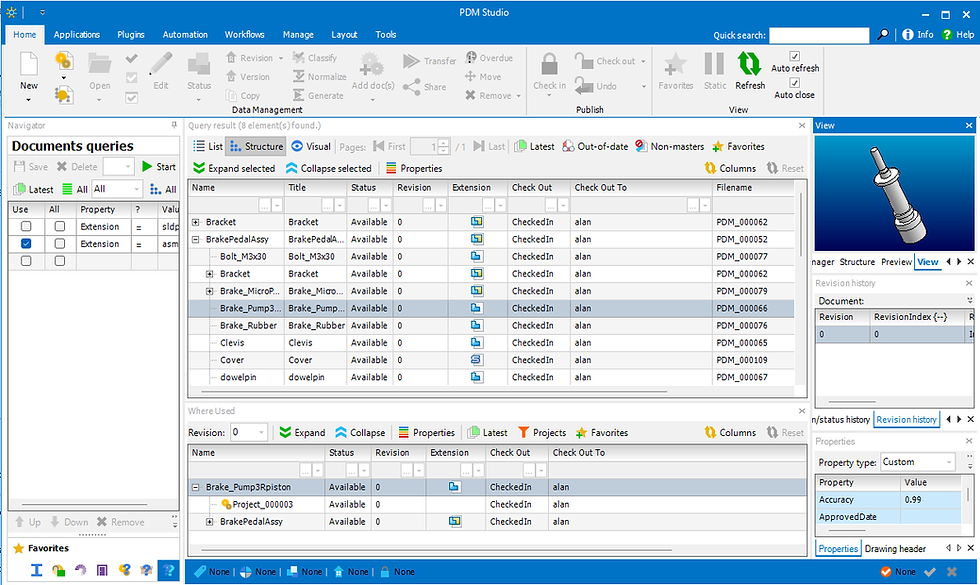
This section examines how PDM Studio addresses many of these concerns and the long-term benefits it delivers.
Potential issues blocking a move to PDM
Set-up
Installation can typically be completed within a day and primarily requires the installation of SQL Server. If a SQL Server database is already in place, the process is even more straightforward. Organisations wishing to start small may use SQL Server Express, which is available at no cost. Once installed, no further database-side configuration should be necessary. PDM Studio server installation is relatively straightforward, though a small amount of set-up is required for the plug-ins.
Pre-planning
Many PDM systems require extensive planning, as CAD file properties must be mapped to database fields for storage, and numerous processes must be configured. This typically necessitates specialist assistance and input from multiple staff members and experts.
None of this is required with PDM Studio, as it can import any CAD property on the fly and store it in the database without additional input. A small number of settings must be created, but these can easily be addressed as part of administrator training.
Data Preparation
This is where many PDM systems fall short, as they require at least one user to verify that all CAD files conform to the standards defined by the PDM system. This may include:
Ensuring required file properties exist and are assigned to the correct fields
Confirming there are no broken links between files
This work can be highly time-consuming and diverts at least one user from their regular responsibilities. Data importation is often performed by a consultant, which adds to the overall cost of the system.
PDM Studio requires no data preparation, as users can easily import data themselves when needed. If broken links exist, the assembly is imported as is, and broken links can be resolved in the same manner as in an unmanaged system. As explained earlier, all CAD file properties are imported and can be used in subsequent files and searches.
Ease of use
PDM Studio is highly intuitive, and users can learn the essentials within a day. A tab is integrated into the CAD software to manage CAD-related functionality, and only minor changes to standard workflows are required, meaning very little additional effort is needed to maintain PDM functionality.
Benefits
Implementing PDM Studio offers numerous benefits and ensures a faster ROI than many traditional PDM system.
Ease of use
PDM Studio features a well-designed interface that can be easily configured by any user, ensuring data is readily displayed. A PDM Studio tab is also added to your CAD system to streamline much of the workflow.
Revision control
Immediate display of where-used information
Visibility of who may have files open
Check in history
File properties
Project and folder capabilities
Standard GUI video https://www.youtube.com/watch?v=r-PzFOxJa8Q
File Duplication/Tracking usage
PDM Studio allows the display to be configured so that projects and folders can be set up in a manner similar to Windows, providing a familiar user experience. Any file can be copied into a PDM Studio folder, but what is copied is a link to the single, authoritative copy, thereby avoiding file duplication. By utilising the where-used display, users can easily determine whether changes to a file will impact other assemblies and can readily copy the file when needed.
Creating projects and folders – https://youtu.be/nogbIDWb07A
Check in/Out and Revisioning
This is a critical aspect of any PDM system. Whenever a file is opened for editing, it is checked out automatically and checked in again upon closing. Each time this occurs, a copy is retained, ensuring that earlier versions can always be restored if edits were made in error. This also tracks who modified files and on what date.
Revisions are managed as a workflow, ensuring that users can track products in both an as-delivered state and under current modifications. In this manner, assemblies can be opened in either state (as released or working).
Revisioning - https://youtu.be/WB3lyLsRIrQ
Data conversion/Automation
PDM Studio provides a highly simple interface for setting up automation of data conversion and file creation, with a plug-and-play toolset that allows users to easily configure their own customisations. Once configured, the process can be run in the background when a file is released, or it can be initiated manually at a time of the user's choosing. This can also be configured to link the PDF, etc., back to the originating document, and output is directed to a defined Windows location (with an option to delete previous copies) for easy distribution to external sources.

This is where significant time savings and error reduction can be achieved. Examples of what can be accomplished through automation include:
Finding all draft documents for a released assembly and convert to PDF
Finding all sheet metal files and create the DXF
Find all part files (not purchased) and create Parasolid/step files for use with CAM
Creating a complete BOM
Creating a BOM of purchased parts
Creating a BOM for sheet metal files
Creating a BOM for all other parts
See automation in action here - https://youtu.be/exY6nzTBmtg
Working from outdated data
One of the less tangible yet critical benefits of PDM is ensuring that all users are working from the correct data. Design engineers will typically work with the most current, unreleased versions of CAD files, whereas shop floor personnel require access only to released data.
PDM ensures that each user sees only the version most relevant to their role. This eliminates scenarios in which a design engineer, under time pressure, inadvertently supplies the wrong file to the workshop for production—an error that can prove extremely costly.


Comments